
Picture two restaurants side by side on Google Maps. Same cuisine. Similar prices. Similar location.
Restaurant A has 12 reviews and a 4.1-star rating. Restaurant B has 180 reviews and a 4.6-star rating.
Without even looking at the menus, without reading a single review, most people will choose Restaurant B. They do not know why exactly, it just feels safer. More trusted. More popular.
That is the power of Google reviews. They are the single most visible trust signal on your entire Google Business Profile. They directly affect your Map Pack ranking. And they influence every potential customer’s decision in the 15 seconds it takes them to scan your listing and choose between you and your competitor.
The gap between Restaurant A and Restaurant B is not about food quality. It is about having a system for getting reviews versus hoping they appear on their own.
This guide gives you that system. By the end of it you will know exactly when to ask, what to say, how to make it effortless for customers, how to respond in a way that actually improves your SEO, and how to handle the reviews you wish had never been posted.
Why Reviews Matter More Than Most Restaurant Owners Realise
Reviews Directly Affect Your Google Ranking
Google uses reviews as one of its three core local ranking signals, alongside relevance and distance. Specifically, Google looks at:
- Review volume: How many reviews you have in total. More reviews = stronger trust signal.
- Review velocity: How consistently you are getting new reviews. A restaurant that gets 5 reviews a month consistently outranks one that got 60 reviews in a single week and then nothing.
- Review recency: When your most recent reviews were posted. A restaurant with 200 reviews but the most recent one being 8 months ago is seen as less active than one with 80 reviews posted regularly.
- Review rating: Your average star rating. Higher ratings correlate with higher Map Pack positions.
Review content: The actual words in your reviews. Google indexes review text, a review mentioning ‘best wood-fired pizza in Austin’ helps you rank for that search.
The review content point is something almost no restaurant knows about. When customers write reviews using your dish names, your cuisine type, and your neighbourhood, those words become keywords associated with your listing. A review saying ‘the truffle pasta here is the best in South Austin’ helps you rank when someone searches ‘truffle pasta South Austin’. Your happy customers are doing SEO for you every time they write a detailed review.
Reviews Are Your Strongest Sales Tool
Before a potential customer calls you, before they visit your website, before they even look at your menu, they read your reviews. Research consistently shows that the vast majority of people read online reviews before choosing a restaurant, and most trust them as much as a personal recommendation from a friend.
This means your reviews are working as a sales team 24 hours a day, 7 days a week. Every positive review is a recommendation. Every detailed review is a piece of content that converts a browsing stranger into a paying customer.
The Most Important Thing Nobody Tells You: Timing Is Everything
The single biggest mistake restaurants make when trying to get more reviews is asking at the wrong time. Most restaurants put up a sign near the door, add a line on the receipt, and wonder why nobody ever scans the QR code.
Here is the truth: customers are most likely to leave a review immediately after their emotional peak, the moment they feel most positive about their experience. Miss that window and the motivation fades within hours.
The Five Right Moments to Ask
| The Right Moment | Why It Works and How to Use It |
|---|---|
| The verbal compliment | When a diner says ‘That was incredible’ or ‘Compliments to the chef’, this is your golden moment. They are already feeling positive and already expressing it. A gentle review request at this exact moment converts at the highest rate of anything on this list. |
| When settling the bill | The bill moment is a natural interaction point where your team has the customer’s full attention. This is when the QR code on the bill folder does its best work. |
| At the door on exit | A genuine ‘Thank you, we hope to see you again soon’ as they leave can be paired with a quick ‘If you enjoyed tonight, a Google review would mean the world to us.’ |
| The post-meal follow-up text | For customers who booked through your reservation system, a text or email 1 to 2 hours after their meal catches them while the experience is fresh and they are relaxed at home. |
| When they post about you on social media | If a customer tags your restaurant on Instagram or shares a photo of your food, they are already enthusiastic. A quick DM reply thanking them and mentioning that a Google review would really help often converts well. |
The wrong moment to ask: When something has gone wrong. If a customer has complained about slow service or an incorrect order, asking for a review before properly resolving the issue is a fast track to a one-star rating. Resolve the problem first. Completely. Then, if appropriate, a follow-up message days later may be warranted. But never ask mid-complaint.
How to Ask for a Review, What to Say and What Not to Say
Most restaurant staff are uncomfortable asking for reviews because they do not know what to say. They worry it sounds pushy or desperate. The reality is that when the timing is right and the phrasing is natural, most happy customers are genuinely glad to help.
The key is making the request feel like a genuine favour, not a corporate marketing script.
The Verbal Ask, What Your Staff Should Actually Say
Here are four versions of the verbal ask that work across different service styles. Train your team to use whichever feels most natural for your restaurant’s personality:
Version 1, Simple and direct (works in any restaurant):
‘We are so glad you enjoyed it. If you ever have a spare moment, a quick Google review really helps a small restaurant like ours. You can scan this code right here on the bill, it only takes 30 seconds.’
Version 2, Warm and personal (works well in independent restaurants):
‘That genuinely means a lot to hear, thank you. We work really hard to make every
meal special. If you felt like sharing that on Google, it would honestly make our week.
The QR code right here takes you straight to our review page.’
Version 3, Light and casual (works well in relaxed, informal settings):
‘Brilliant, really glad you liked it! If you want to help us out, a Google review
does more for us than you might think. The code on the bill makes it quick, 30 seconds tops.’
Version 4, For the customer who specifically praises a dish:
‘I will pass that on to the kitchen, they will be so happy to hear that. If you wanted
to mention the [dish name] in a Google review, it would really help other food lovers
find us when they are searching for it. The code on the bill makes it easy.’
Notice what all four have in common: they are short, they feel genuine, they give a reason why reviews matter, they make the action sound easy, and they point to the QR code immediately. No begging. No pressure. Just a natural, human request.
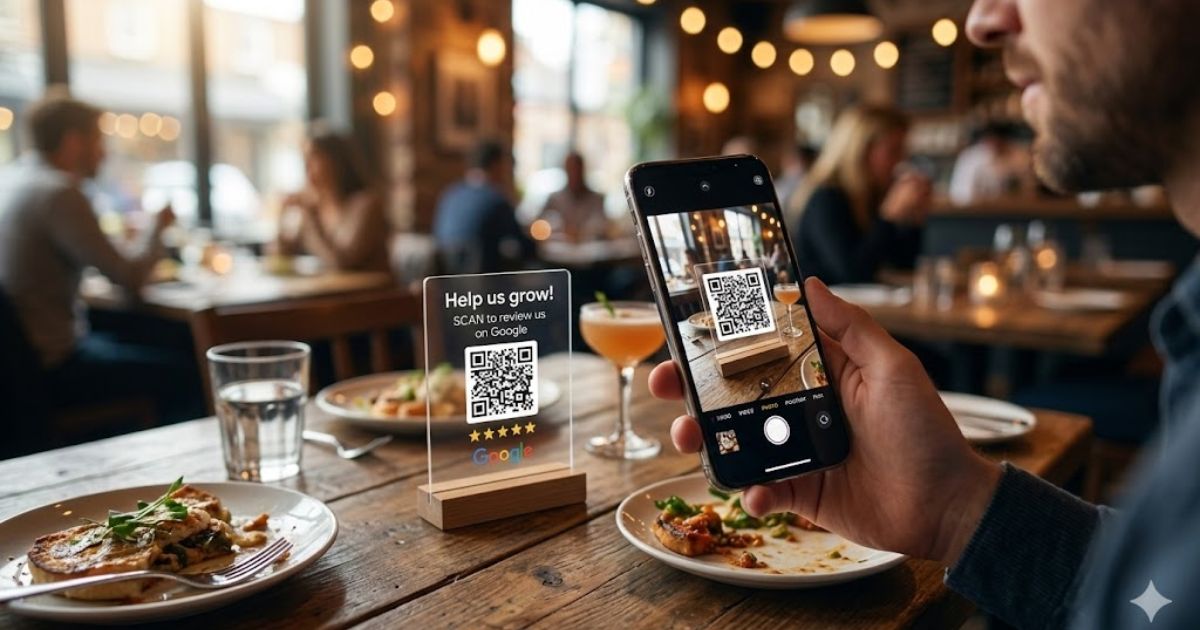
The QR Code, Make Leaving a Review a 15-Second Action
The harder you make it to leave a review, the fewer reviews you will get. Every extra step loses people. Your goal is to get from ‘restaurant asked me for a review’ to ‘review submitted’ in under 30 seconds.
Here is how to set up your restaurant’s Google review QR code:
- Go to your Google Business Profile dashboard
- Click on ‘Ask for reviews’, Google will generate a short review link for your specific listing
- Copy that link and go to any free QR code generator (qr-code-generator.com, qrcode-monkey.com, etc.)
- Paste your link and generate the QR code, download it as a high-resolution PNG
- Place the QR code on your bill folder, table card, exit card, and receipt
Design tip: Add a simple instruction above the QR code, ‘Enjoyed tonight? Scan to leave a Google review, takes 30 seconds.’ People who have never used a QR code for reviews need to know what it does before they scan. A clear label triples the scan rate.
The Follow-Up Message, Your Highest-Converting Review Channel
For restaurants that collect customer contact details through reservations, whether through OpenTable, Resy, your own website booking form, or a phone reservation where you take an email, the post-meal follow-up message is your single highest-converting review channel.
Why? Because it catches the customer at home, relaxed, 1 to 2 hours after their meal when the experience is fresh. They are not rushing to the next thing. They have time. And you have given them a direct link so leaving a review is a single tap.
Follow-up text message (send 1-2 hours after the reservation end time):
‘Hi [Name], thank you so much for dining with us at [Restaurant Name] tonight.
We hope you had a wonderful evening. If you enjoyed your meal, we would be
genuinely grateful if you had a moment to leave us a Google review:
[your short review link]
It only takes a minute and helps other diners find us.
We hope to see you again soon.’
Follow-up email (works well for larger bookings and event dining):
Subject: Thank you for dining with us, [Name]
‘Hi [Name],
Thank you for joining us at [Restaurant Name] last night. It was a pleasure having you.
If you enjoyed your evening, we would love it if you shared your experience on Google. Reviews from guests like you help other diners discover us, and they genuinely make a difference to a small, independent restaurant.
Leave a review here: [your short review link]
We hope to see you again soon.
[Your name] and the team at [Restaurant Name]’
Timing matters: Send your follow-up message between 1 and 3 hours after the reservation end time. Too soon (mid-meal) feels intrusive. Too late (next day) and the emotional memory has faded. The 1 to 3 hour window is consistently the highest-converting timing for restaurant review follow-ups.
The Strategy That Makes Your Reviews Do Double Duty
Most restaurant owners think of reviews purely as social proof, stars and words that make new customers feel safe. That is true. But reviews are also doing something behind the scenes that almost nobody knows about.
Google indexes the text of every review left on your listing. The words customers use in their reviews become keywords associated with your restaurant in Google’s search index.
This means a review that says ‘best authentic wood-fired Neapolitan pizza in South Austin’ actively helps your restaurant rank when someone searches ‘authentic Neapolitan pizza South Austin’. Your happy customers are doing SEO for you, but only if they write reviews with enough detail to contain your relevant keywords.
How to Gently Guide Customers to Write Keyword-Rich Reviews
You cannot tell customers what to write. But you can give them a helpful starting point, because the honest truth is that most customers have no idea what to write in a review. They sit down, click the stars, and then stare at the text box. A gentle prompt removes that friction and gets you more detailed, keyword-rich reviews at the same time.
The soft keyword prompt, what to say when asking verbally:
‘If you feel comfortable, mentioning the specific dish you enjoyed or what brought you in tonight really helps other [cuisine type] lovers in [city] find us when they are searching for the same thing you were.’
Notice what this does: it naturally encourages the customer to mention the dish name (keyword), the cuisine type (keyword), and the city (keyword), all in a way that feels helpful and natural, not like an SEO instruction.
On your QR code card, try adding a soft prompt underneath:
‘What did you love most? The wood-fired pizza? The atmosphere? The service?
Let other [city] diners know, your review helps them find their next favourite restaurant.’
Real example of a keyword-rich review versus a generic one:
Generic: ‘Really nice food and good service. Will come back.’
Keyword-rich: ‘The truffle mushroom risotto at this South Austin Italian restaurant is genuinely the best I have had outside of Italy. Staff were warm and knowledgeable about the menu. Perfect for a date night in Austin.’
The keyword-rich review contains: truffle mushroom risotto, South Austin, Italian restaurant, date night Austin. Google reads all of those. Your listing becomes more likely to appear for each of those searches. Both reviews give you a star, but only one does SEO work.
How to Respond to Reviews, The Art That Most Restaurants Get Wrong
Most restaurants either do not respond to reviews at all, or they copy-paste the same ‘Thank you for your lovely review!’ reply to every positive one. Both approaches waste a significant opportunity.
Here is what responding to reviews actually does for you:
- Google indexes your responses, every word you write in a response is associated with your listing and contributes to your keyword relevance
- Potential customers read responses, especially on negative reviews, your response tells them how you handle problems
- Response rate signals activity, regularly responding shows Google your profile is actively managed, which is a ranking signal
- It builds customer loyalty, a personalised response makes a reviewer feel valued and increases the chance they return
Responding to Positive Reviews
The goal is to be genuine, specific, and naturally keyword-rich, without sounding like you are writing for an algorithm.
Weak response (what most restaurants write):
‘Thank you so much for your wonderful review! We really appreciate your support and hope to see you again soon!’
Strong response (what you should write):
‘Thank you, Sarah! We are so glad you loved the slow-braised short rib, it is one of our kitchen team’s favourite dishes to prepare, and it means a lot to hear it landed so well.
Our South Austin steakhouse team works hard to make every dinner feel special, and knowing you felt that makes it all worthwhile. We cannot wait to welcome you back to Ember and Oak.’
The strong response naturally contains: the dish name (slow-braised short rib), the location (South Austin), the business type (steakhouse), and the restaurant name (Ember and Oak). Google indexes all of it. The customer feels genuinely acknowledged. And anyone reading reviews sees a restaurant that pays attention.
The keyword response formula:
When responding to a positive review, try to naturally include:
- The customer’s first name (personal touch)
- The specific dish or aspect they mentioned (reinforces dish keywords)
- Your neighbourhood or area of the city (location keyword)
- Your cuisine type or restaurant type (category keyword)
- Your restaurant name (branded keyword)
- A genuine closing that invites them back
You do not need all six every time. Even hitting three or four makes the response significantly more valuable than a generic thank-you.
Responding to Negative Reviews, The Approach That Wins Customers
A negative review is not the end of the world. In fact, a well-handled negative review can actually win more customers than it loses, because people reading your reviews pay close attention to how you respond to complaints.
A restaurant that handles criticism with grace, professionalism, and a genuine desire to make things right signals to potential customers: ‘This place cares about its guests.’
Here is the exact framework for responding to negative reviews:
- Thank them: Open by genuinely thanking them for the feedback, even if it stings. ‘Thank you for taking the time to share this with us.’
- Acknowledge without making excuses: ‘I am really sorry to hear your experience did not meet the standard we hold ourselves to.’ Not: ‘We were very busy that night and short-staffed.’
- Take it offline: ‘Please do reach out to us directly at [email] or [phone], we would very much like to make this right for you.’
- Keep it brief: Long defensive responses look worse than a short, gracious one. Five sentences is usually enough.
- Never argue: Even if the review is factually wrong. Your response is being read by hundreds of potential customers, not just the person who wrote the review.
Example response to a negative review about slow service:
‘Thank you for sharing this, and I am genuinely sorry that the pace of service fell short during your visit. That is not the experience we want for any of our guests, and I completely understand how frustrating that must have been, especially on a special occasion.
Please do email us at [email], we would love the chance to make it up to you.
Thank you again for the honest feedback. It helps us improve.’
Never offer a free meal or discount in a public review response. It looks like you are trying to buy silence, and it can encourage others to leave negative reviews hoping for compensation. Take all resolution conversations to a private channel, email or phone.
Google Reviews vs. TripAdvisor vs. Yelp, Where to Focus
Restaurants get asked about reviews on multiple platforms and it can feel overwhelming to manage all of them. Here is a clear-headed view of where your energy should go:
| Platform | Priority and Focus |
|---|---|
| Google Reviews | Your absolute top priority. Google reviews directly affect your Map Pack ranking and are the most visible to the most people. Focus 80% of your review-building effort here. |
| TripAdvisor | Still hugely influential for restaurants, particularly for tourists, travellers, and people new to an area. A strong TripAdvisor presence is worth maintaining, aim for 15% of your effort here. |
| Yelp | More relevant in the US, particularly for urban restaurants. Also feeds Apple Maps results. Worth a presence but 5% of your effort is sufficient unless you are in a Yelp-heavy market like San Francisco or New York. |
| Facebook Reviews | Your Facebook Business Page has a review/recommendation feature. These are visible to local Facebook users and worth maintaining, but they do not directly affect your Google ranking. |
| Delivery platforms | Uber Eats, DoorDash, and Deliveroo all have rating systems. These are important for your performance on those platforms but separate from your local SEO rankings. |
The simple rule: ask every customer for a Google review first. If they mention they prefer TripAdvisor or already have an account there, redirect them to TripAdvisor. But Google is always the default.
What Never to Do, The Mistakes That Can Destroy Your Rating
Never buy reviews: Paid review services exist and they are a trap. Google’s detection systems are sophisticated. Fake reviews are regularly removed in bulk, sometimes taking genuine reviews with them, and listings can be penalised or suspended. The short-term gain is never worth the long-term risk.
Never incentivise reviews: Offering a free dessert, a discount, or any incentive in exchange for a review violates Google’s policies. It also tends to produce reviews that feel hollow because the customer knows they are being compensated. Genuine reviews from genuinely happy customers are always more valuable.
Never ask for only positive reviews: Asking customers to ‘leave a 5-star review if you enjoyed your meal’ rather than simply asking for a review is a policy violation and customers find it uncomfortable. Ask for a review. Let them choose their rating honestly.
Never ignore negative reviews: A negative review with no response looks much worse than one with a thoughtful reply. Silence signals that you either do not care or have no answer to the complaint. Always respond.
Never ask for reviews during the meal: Asking mid-service, before the experience is complete, is awkward and premature. Wait until the bill or the exit. Let the full experience land first.
Never get defensive publicly: A restaurant owner arguing with a negative reviewer in public, line by line, is one of the most off-putting things a potential customer can read. Handle disputes privately and keep your public responses calm and professional.
The Complete Restaurant Review System, Summary
Here is your entire review strategy on one page:
| Action | Why It Is in the System |
|---|---|
| Ask at the verbal compliment moment | Your highest-converting ask, happens naturally in good service |
| QR code on bill folder and table card | Makes the action effortless, 15 seconds from request to submission |
| Follow-up text or email 1-2 hours post-meal | Catches customers at home, relaxed, experience still fresh |
| Social media DM when customers tag you | They are already enthusiastic, a gentle redirect converts well |
| Soft keyword prompt when asking | Encourages detailed, keyword-rich reviews without telling people what to write |
| Respond to every review within 24 hours | Signals activity to Google, builds customer loyalty, indexes keywords |
| Use keyword-rich response formula | Every response is a free keyword placement in Google’s index |
| Handle negatives with the 5-step framework | Calm, brief, take it offline, wins more customers than it loses |
| Set a monthly review target and track it | Consistency beats campaigns, 8 to 12 per month is the goal |
| Review your GBP performance weekly | Spot declines early and fix the system before momentum is lost |
Every week that passes without a review system in place is a week where your competitor, who does have a system, is pulling further ahead of you on Google.
The good news is that getting reviews is not hard. Your customers are already having great experiences. They just need a moment, a prompt, and an easy way to share it. This system gives you all three.
Pick one thing from this guide and implement it today. Add the QR code to your bill folder. Train your team on the verbal ask. Set up the follow-up text. One step is all it takes to start moving the number.
Consistent reviews build a ranking that consistent reviews maintain. Start this week.
Explore for more such info – thejatinagarwal.in and for more guides covering specific Google Business Profile issues, troubleshooting steps, and local SEO strategies, browse our complete Local SEO resource hub.
Read Next
Reviews are one part of a complete restaurant local SEO strategy. Here is where to go next:
- Your complete Google Business Profile setup: Google Business Profile for Restaurants, Complete Setup Guide
- All proven local SEO strategies for restaurants in one place: 12 Proven Local SEO Strategies for Restaurants
- The broader local SEO foundation your restaurant needs: Complete Local SEO Guide for Small Businesses
- GBP listing suspended unexpectedly? Read: Google Business Profile Keeps Getting Suspended, Here Is the Fix